Bouncer Vaultby S6 Studios

Features

What Bouncer Vault does

Bouncer Mobile and Bouncer Desktop handle approvals, grants and history for the people who look after secrets. Scripts and AI agents ask through the command line or the MCP server.

For approvers

Bouncer Mobile and Bouncer Desktop show what is being asked for and let you answer it.

What a request shows

Each request shows the requester, the resource, whether it is a read or a save, the reason in the requester's own words, and the time left to answer. More information shows the source host, the network address the server saw and what your approval signs, each marked Verified, Observed or Reported by requester.

You choose the length

Approve for the requested time or change it: by default 5m, 15m, 1h, 6h, 24h, 7d or Always, or a custom length up to the resource's limit. Choosing longer than requested asks you to confirm. Your server sets the choices.

Deny, or flag it

Deny a request you know about. I don't recognise this denies it, flags it in the approval log, and shows the commands your administrator can use to revoke that requester's key or end every grant at once.

Grants and history

Grants lists the access you approved, with Revoke to end it early. History lists every decision, newest first.

Notifications without secrets

Where push is set up, a notification carries only random IDs and the app fetches the details from your own server. On Android you can opt in to approving from the notification. Phone notifications from your own server to the official apps aren't available yet: they need a sending key for S6 Studios' notification project, which we don't hand out. Until that changes, the apps show waiting requests whenever you open them.

Approval key design

The official apps use Android Keystore, iPhone Secure Enclave or a Windows Hello passkey. Android can use a per-signature biometric key. The server can't verify these equally on every platform; see the security model.

For credentials

Bouncer guards stored secrets, stored API keys and SSH access to hosts. Your administrator decides, per resource, what people can do in the apps.

View where allowed

Where a resource allows it, you can view a value in the app. Each view is signed like an approval, recorded by the server, and the value isn't kept on the device. Copies are cleared from the clipboard after about 30 seconds.

Save without seeing

Approve a request to save a new value without the value ever passing through your device. It goes from the requester straight to your organisation's server.

Personal credentials

If your server allows it, create your own credentials in the Library and share them with chosen people, with or without approval for each use.

SSH host access

For SSH, each use gets a fresh OpenSSH certificate for one account, signed by OpenBao. Revoking a grant stops new issuance. A host refuses an issued certificate once it has installed the updated revocation list, or once the certificate expires. The supplied timer checks for a new list every 15 seconds, but delivery isn't guaranteed. Open sessions stay open. Revocation-list delivery hasn't been tried on a real host yet.

Screenshot and copy reports

From version 0.5.2, while a secret is on screen the app tells your server about screenshots, screen recording and copies where the platform reports them. The report never includes the image, the secret or what you copied.

Capture protection

On Android and Windows, screens that show a secret are kept out of screenshots and recordings unless you turn on Allow screenshots. iPhone doesn't let apps do this.

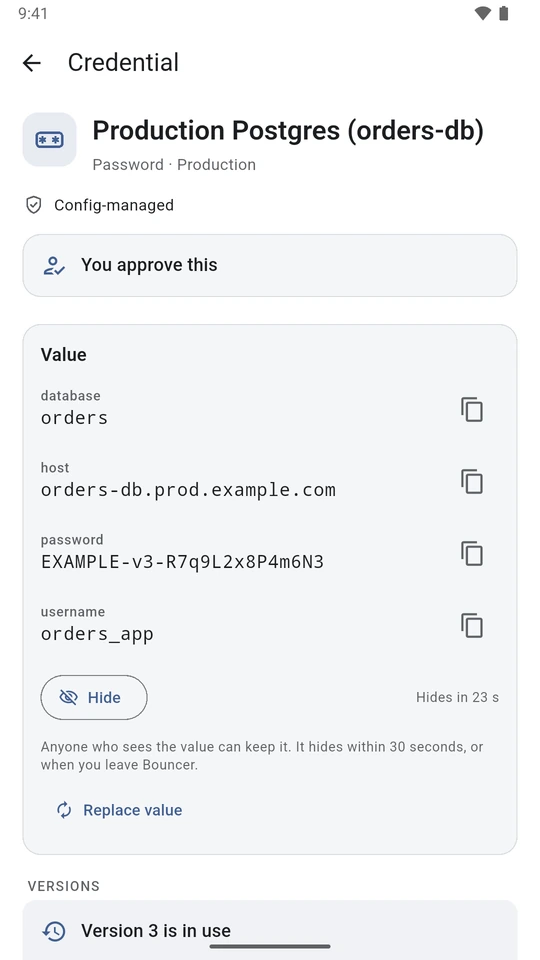
Production Postgres credential with its database, host, an EXAMPLE password and username shown, each with a copy button, and a note that the value hides in 23 seconds.
A database password, shown where the resource allows viewing. It hides again within 30 seconds.
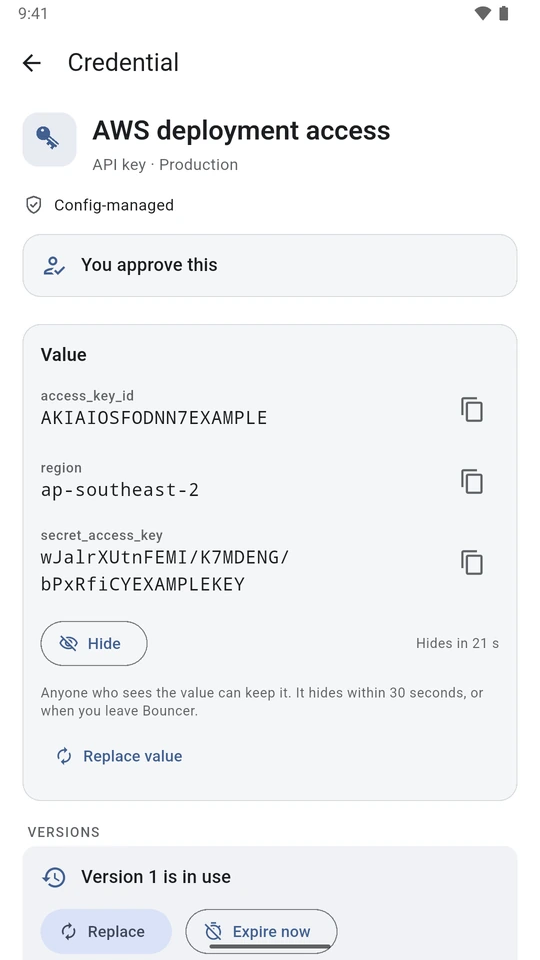
AWS deployment access credential showing the documented AKIAIOSFODNN7EXAMPLE access key ID, the ap-southeast-2 region and an example secret access key, with a countdown until it hides.
An AWS access key pair, using AWS's documented example values.
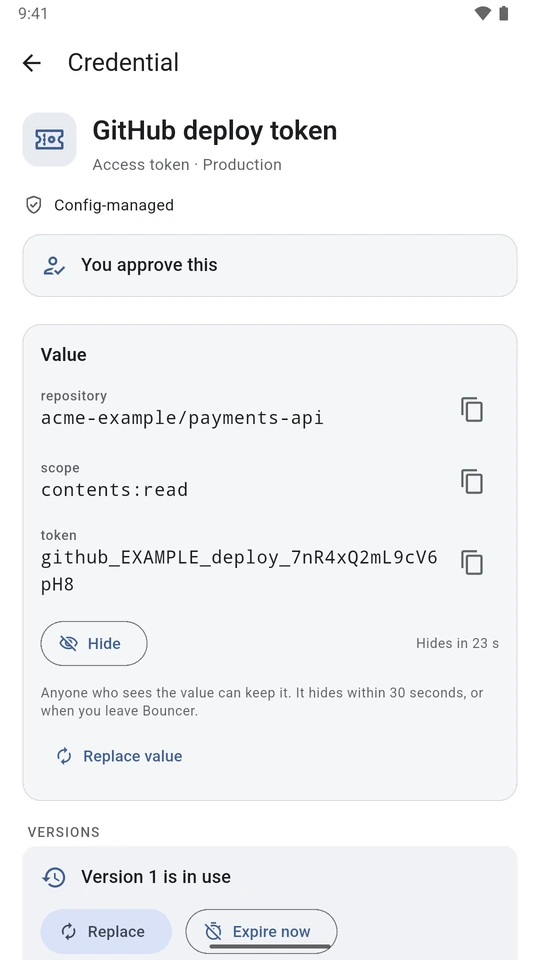
GitHub deploy token credential for acme-example/payments-api with contents:read scope and a deliberately invalid EXAMPLE token.
A deploy token for one repository. Every value on these screens is fake, and they're from the current development build, so the wording differs slightly from 0.5.8.

For requesters, scripts and AI agents

These are example uses of the same request-and-grant workflow. Give each person, host or agent its own requester key so approvers can tell them apart and an administrator can disable one separately.

A person at a terminal

For example, to use a stored database password for a maintenance job, bouncer request asks, bouncer wait waits for the answer, and bouncer exec runs a command with the secret in its environment. This is a stored password, not a new database account issued for the job. The wrapper does not print the value, but the command and anything it starts can read it, print it, log it or send it elsewhere.

MCP for AI agents

For example, an agent preparing a release can ask for a stored API key through bouncer-mcp, which uses the Model Context Protocol (MCP). It can wait for a decision; no tool signs an approval or denial. The get_secret tool returns the value to the agent, so it becomes part of the conversation. bouncer exec doesn't hand the value back to the agent, but command output can still expose it to the agent.

A scheduled team job

A team can approve a grant for a scheduled export ahead of time. Use bouncer exec with --no-request: if no grant is active, it exits rather than filing a request nobody is there to answer. Keep the grant as short as the schedule allows. Anyone holding the requester key can use the secret for the whole grant. Ending it stops new issuance; a running job still has any value it already read.

How requesters are labelled

Host and client names a requester sends are shown as reported, never as verified. Agents run with their own key, so approvers see "Your own agent", not "Self-approval".

For administrators

Self-hosted server

The Bouncer server runs on Linux with Docker Compose or Podman, next to PostgreSQL and your OpenBao. The role kit sets up Bouncer's OpenBao role. It limits which tokens Bouncer can issue, can revoke tokens by accessor, reads values you allow people to view in the app, writes to the save paths you configure, and reads and writes configured personal credential namespaces.

Emergency stops

bouncer-admin revoke --all ends active grants and tries to revoke issued tokens. Failed token revokes are retried; an issued token can remain usable until revocation succeeds or it expires. The role kit also provides an emergency stop independent of Bouncer. Neither recalls copied values nor closes downstream sessions.

Policy in a config file

Resources, approvers, durations and limits live in the server's config file, which you can keep in your own Git repository. Changes that loosen policy are logged and announced to approvers.

Current limits. People are set up in the server's config file; single sign-on through an identity provider isn't connected yet. There is one approval per request. Windows gets requests only while Bouncer Desktop is running. Phone notifications from your own server to the official apps aren't available yet. Standing grants (Always) are on in the default config; we recommend turning them off. The security model lists the rest.

Coming soon

None of these is in a published release yet, and none has a date. Items marked Built, not yet released will ship in the first release after 0.5.8. In development means work has started, with no release to install yet. Planned means it isn't built yet. Plan around what Bouncer does today.

Built, not yet released

Audit log forwarding

The server sends every approval log entry, in order, to syslog, a webhook or OpenTelemetry, for your SIEM or log store. It keeps its place in the database, so a restart carries on where it stopped.

Built, not yet released

A tamper-evident audit log

Each entry carries the hash of the one before it, so an entry that is edited, deleted or moved breaks the chain. The server checks it when it starts and every hour. Keep a copy of the newest hash off the server to catch someone who rewrites the chain.

Built, not yet released

Sign in to enrol devices

When a server is set up for it, people enrol a phone or PC by signing in through your organisation's identity provider (Keycloak) instead of using a pairing code. Bouncer's own access list and resource policies still decide what each person can do.

In development

Bouncer Desktop for Mac

The approver app for Mac. There's no supported release to install yet.

Planned

Just-in-time SSH gateway

SSH access through a gateway, tied to a Bouncer grant. Sessions would be recorded, and a live session would end when its grant expires or is revoked. Bouncer would stay in charge of requests, approvals and the audit trail.

Planned

RDP access

Approved, time-limited access to Windows machines over Remote Desktop. It would use the same request and approval flow.